
The backend’s plugin system comes from upstream fastapi-best-architecture (FBA). Each plugin is a directory under apps/api/backend/plugin/ with a plugin.toml saying what it is, where it mounts, which settings it needs, which plugins it depends on and which databases it supports; at start-up the backend scans these directories and wires in their routes, settings and hooks. Approvals, the AI assistant, the open platform, SMS and notifications are all plugins. Since 1.0 the plugin interface is part of the compatibility promise: plugin.toml fields, the fba add install flow and the extension points listed below will not change in breaking ways, so third-party plugins keep installing and running (see Upgrading).
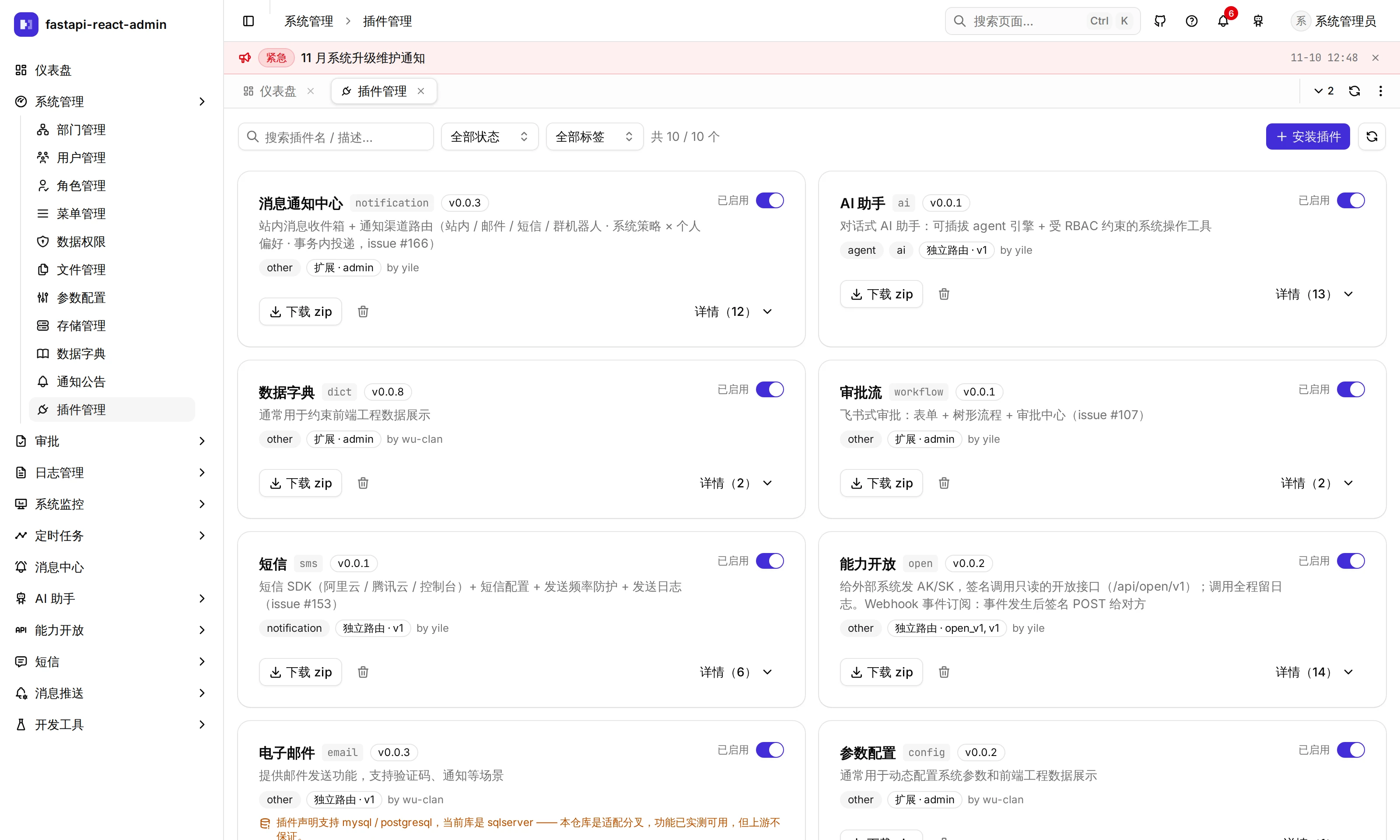
Where is it in the UI?
Section titled “Where is it in the UI?”| Screen | Path | Who | What it does |
|---|---|---|---|
| System → Plugins | /system/plugin | Superusers | One card per plugin: description, version, tags, kind, supported databases, the actual API prefix, settings; enable / disable, Download zip, Uninstall, install from a zip or a git URL |
| Command line | fba add / fba remove | Whoever has server access | Install / uninstall plugins, including tables and seed data |
Every Plugins endpoint is guarded by superuser, not a permission code.
Which plugins are built in?
Section titled “Which plugins are built in?”| Plugin | What it is | Kind | Dependencies |
|---|---|---|---|
ai | AI assistant | Own routes | |
config | Config | Extends admin | |
dict | Data dictionary | Extends admin | Required, cannot be uninstalled |
email | Sending email | Own routes | plugin.toml declares only PostgreSQL and MySQL; it has no tables |
notice | Notices | Extends admin | notification |
notification | In-app messages and channel routing | Extends admin | |
oauth2 | GitHub / Google third-party sign-in | Own routes | |
open | Open API (AK/SK endpoints, webhooks) | Own routes | |
sms | SMS (Alibaba Cloud / Tencent Cloud) | Own routes | |
workflow | Approval workflow | Extends admin | notification |
Extending plugins merge their routes into an existing app (config’s endpoints land at /api/v1/sys/configs, for example); own-route plugins bring their own set. The Plugins page lists both the declared prefix and the actual mount point.
What goes in plugin.toml?
Section titled “What goes in plugin.toml?”[plugin]summary = "审批流" # 1–100 charactersversion = "0.0.1" # x.y.zdescription = "…" # 1–500 charactersauthor = "yile"tags = ["other"] # ai / mcp / agent / auth / storage / notification / task / payment / otherdatabase = ["mysql", "postgresql", "sqlserver"]depends_on = ["notification"] # Plugins this one needs; no self-dependency, cycles or missing ones are errors
[app]extend = "admin" # Extending: merged into backend.app.admin.api under the same path# router = ["v1"] # Own routes: these routers are taken from the plugin's api/router.py
[api.workflow] # The key must match a file name under api/prefix = "/workflow"tags = "审批流"
[settings] # Upper-case keys; values are strings, numbers, booleans or lists of stringsWORKFLOW_AI_APPROVE_ENABLED = true- Dependency order decides the order of route injection and of SQL execution in
fba init. - A plugin with
model/must declaredatabaseand ship complete init / destroy SQL for each declared database (SQL Server only needs the snowflake-key pair). - How
[settings]reachessettings: precedence is process environment >.env>plugin.toml. But a key written only inplugin.tomland not declared incore/conf.pyis an “extra” that container environment variables cannot override, which is why every built-in plugin setting is declared again inconf.py(type only, no default). Conversely, a key declared inconf.pywith a default ignores the value inplugin.toml. - A plugin’s
requirements.txtis installed withuv pipand checked again on every backend start; its.env.exampleis appended to.envon install.
How do I install, uninstall or disable a plugin?
Section titled “How do I install, uninstall or disable a plugin?”Command-line install (development environments only):
fba add --path ./my_plugin.zip # or --repo-url <git URL>fba add --path ./my_plugin.zip --no-sql # no tables, no seed SQLIt unzips or clones, appends .env.example, installs dependencies, creates the plugin’s tables and runs the init SQL for the current database. It does not use Alembic migrations. Zip requirements: the plugin directory at the root, containing at least plugin.toml and README.md; the plugin name comes from the zip’s file name. fba remove <plugin> runs the destroy SQL, uninstalls dependencies, packs the directory into a .backup.zip and deletes it; required plugins are refused. Restart the backend after either.
Install / uninstall on the Plugins page is also development-only, but creates no tables and runs no SQL (uninstall runs no destroy SQL either); on success it says to configure per the plugin’s README and restart. Use the command line when tables are needed.
Enable / disable is the switch on the Plugins page, stored in Redis.
- Disabling takes effect immediately: every plugin’s routes are mounted at start-up and each request checks the plugin’s status first, so a disabled plugin’s endpoints return “Plugin X is not enabled, please contact the administrator” (HTTP 500).
- A disabled plugin’s AI tools disappear from the tool list; disabling
aialso closes the MCP gateway. - Plugin start-up hooks (
setup/lifespan) only run for plugins enabled at start-up, so that part needs a restart; a newly installed plugin’s routes also appear only after a restart. - Disabling does not hide menus: those sidebar entries remain and their endpoints fail.
Which extension points can a plugin use?
Section titled “Which extension points can a plugin use?”At start-up these file names are looked for in every plugin directory and loaded if present:
| File | Registers | Built-in users |
|---|---|---|
hooks.py | The setup(app), lifespan and otel(app) hooks | ai |
notification_kinds.py | Notification kinds (allowed channels, default policies), see Messages and notifications | notice, open, workflow |
data_change.py | Data change history registrations, see Logs and audit | config, oauth2 |
dataio.py | Import / export resources, see Import and export | dict, notice |
webhook_events.py | Open-platform webhook events | workflow |
sms_templates.py · sms_providers.py | SMS business templates · SMS providers | workflow (templates) |
ai_tools.py | Tools the AI assistant can call, see AI assistant | workflow |
These scans do not check whether the plugin is enabled: a disabled plugin’s notification kinds and import / export resources stay registered, its endpoints just fail.
A plugin’s frontend pages
Section titled “A plugin’s frontend pages”The frontend does not pick up a plugin’s pages automatically. For a plugin to have pages in the admin it needs:
- A page component under
packages/platform/src/pages/<name>/ - A route file under
apps/web/src/routes/_auth/ - A “route → component” entry in
apps/web/src/lib/page-registry.tsx(multi-tab mounts pages through it) - Menu rows in the plugin’s init SQL
A menu whose path has no frontend route is skipped in the sidebar, with a console warning in development. The full “add a page” walkthrough is Adding a business module from scratch.
What it does not do
Section titled “What it does not do”- Installing / uninstalling on the Plugins page creates no tables and runs no SQL; production cannot install plugins from the page.
- Disabling a plugin does not hide its menus, and calls to a disabled plugin return 500 rather than a more fitting status.
- The enable switch does not check required plugins, so
dictcan be disabled on the page. - When the Plugins page judges “supported databases”, the current database is hard-coded as SQL Server instead of reading the actual
DATABASE_TYPE. - The built-in
ai,smsandworkflowplugins have noREADME.md, so downloading their zip from the page and installing it again fails the “must have a README” check. - The plugin conventions are backend-only; frontend pages are wired by hand as in the four steps above.
Where is the code?
Section titled “Where is the code?”- Plugin loading:
plugin/core.py(dependencies and required plugins) ·router.py(route injection) ·validator.py(plugin.tomlvalidation) ·settings_source.py·status.py(enable check) ·hooks.py - Installing:
plugin/installer.py· command linecli.py· Plugins endpointsapi/v1/sys/plugin.py - Frontend:
pages/plugin/·apps/web/src/lib/page-registry.tsx - Upstream plugin docs: FBA documentation
How is it tested?
Section titled “How is it tested?”tests/test_plugin_order_is_deterministic.py: plugins sorted by dependency come out in the same order every time.tests/test_sql_scripts.py: every plugin’s SQL scripts are present.- Effects of disabling: disabling
aicloses the MCP gateway (test_ai_mcp.py); disablingworkflowremoves its AI tools (test_ai_workflow_tools.py). - Not tested:
plugin.tomlvalidation, the installer, the Plugins endpoints; the Plugins page has no E2E.
Try it on the demo
Section titled “Try it on the demo”On the live demo (admin / 123456), open System → Plugins to see each plugin’s declared and actual API prefix and its settings. The demo is not a development environment, so install and uninstall are refused; please don’t disable plugins, everyone shares this instance.