
Config and data dictionary
Config is a key / value table. When the backend needs a group of settings it reads them from the database and overrides the same keys from .env, so a change an admin makes in the UI needs no restart. The page is grouped by purpose (sign-in policy, passwords and lockout, sessions, email, notification delivery, webhooks, file uploads, log…), and each item has a description, a unit and an allowed range; the backend validates the range on write, so a bad value never lands in the database. The data dictionary is a separate table: a “dictionary type” with a list of items (label, value, colour, sort order), meant for drop-down options and status labels in business pages.
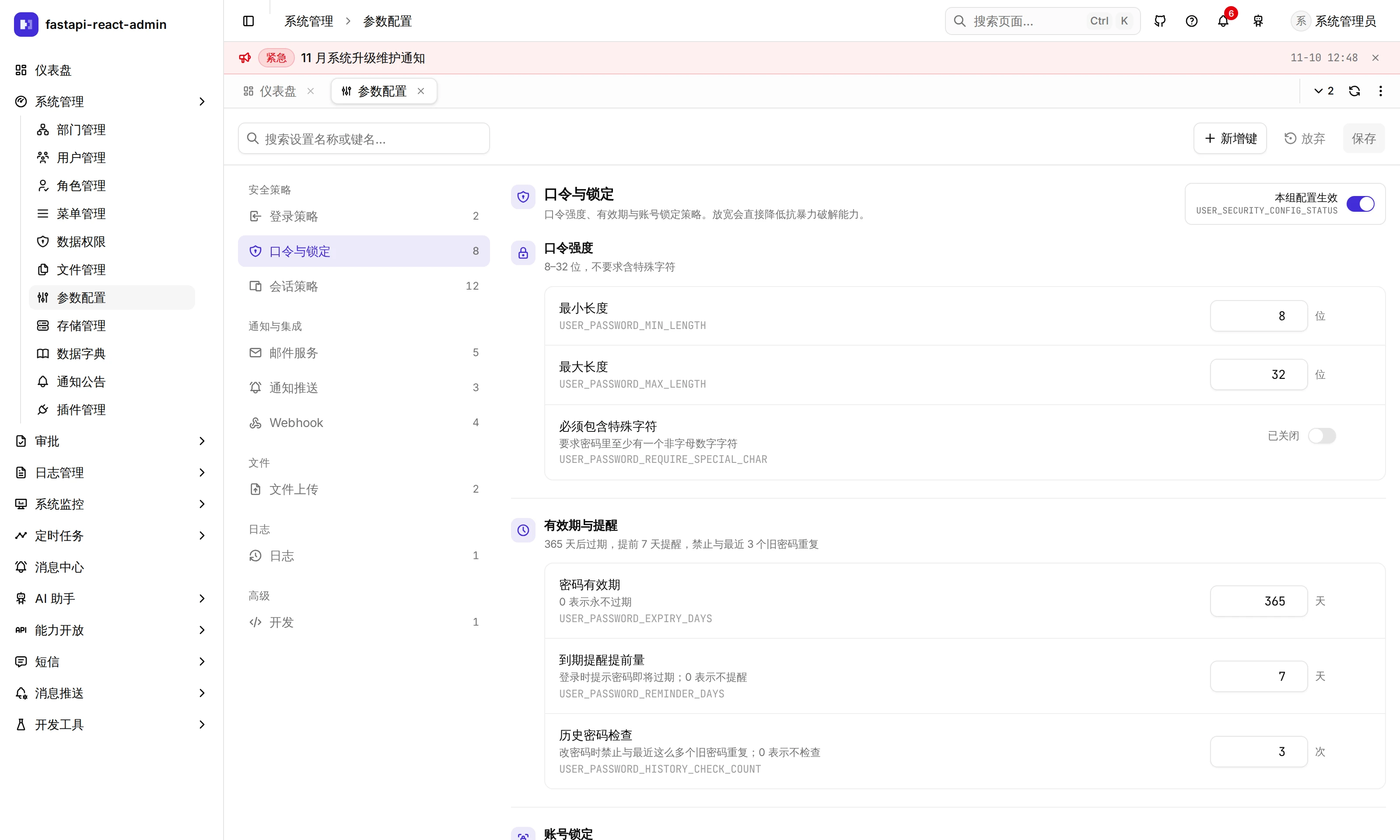
Where is it in the UI?
Section titled “Where is it in the UI?”| Screen | Path | Needed to open the page | Other permission codes |
|---|---|---|---|
| System → Config | /plugins/config | sys:config:edit | View sys:config:list · Add key sys:config:add · delete sys:config:del; each row’s Change history needs log:change:list |
| System → Data dictionary | /plugins/dict | dict:type:add | Types dict:type:list · edit · del; items dict:data:list · add · edit · del · import · export |
⚠️ As with several other admin screens, these two pages’ frontend route guards check the edit / create code rather than the view code, so a role granted only viewing cannot open them.
Which groups are on the Config page?
Section titled “Which groups are on the Config page?”| Section | Group | Contents | See |
|---|---|---|---|
| Security | Sign-in policy | Image captcha switch, required two-factor | Security configuration |
| Passwords & lockout | Failure lockout, password length / special characters / history / lifetime | same | |
| Sessions | Idle timeout, maximum lifetime, session cap and over-limit behaviour for web / desktop / mobile | same | |
| Notifications & integrations | Email service | SMTP host, port, SSL, account, password | Messages and notifications |
| Notification delivery | External channel master switch, retries, delivery record retention | same | |
| Webhook | Master switch, auto-disable threshold, record retention, endpoints per app | Open API | |
| Files | File uploads | Chunking threshold, chunk size | Files and storage |
| Log | Log | Data change history retention | Logs and audit |
| Advanced | AI · Development · Unmanaged keys | AI is a reserved, empty group; Development holds the component sandbox switch; keys you add yourself land in Unmanaged keys |
The seed data has 46 rows in all. Each item’s default, range and when it takes effect are in the “Which settings are there?” section of the matching feature page and are not repeated here.
How soon do changes apply, and can they break things?
Section titled “How soon do changes apply, and can they break things?”- No restart. A write clears the cache, and the next read picks up the new value: sign-in and captcha settings are read on every request, email on every send, webhook and retention values straight from the database each time. Two groups only affect what comes after: Sessions apply to later sign-ins (existing sessions keep the rules they started with) and File uploads to uploads that start afterwards.
- Each group has a master switch,
<GROUP>_CONFIG_STATUS. Set to0, the group is not read from the database and the.envvalues apply. Conversely, while the group is on, database values override.env, which is why turning the captcha off in.envdoes nothing (see the FAQ). - The backend validates writes, not just the input boxes: integers have bounds (minimum password length 1–128, session idle time 5 minutes to 90 days, for example), fixed-choice keys accept only their values, and two-factor cannot be made mandatory while
MFA_SECRET_KEYis unset. It was tested once: without this check, calling the API directly with an admin token could set the minimum password length to 999, after which nobody could change their password. - Reads have a fallback too: an invalid value in the database (emptied, out of range) falls back to the
.envvalue for that item with an error logged, rather than making sign-in fail with a 500.
Can I add my own config keys?
Section titled “Can I add my own config keys?”Yes, with Add key. Two things to know:
- Your own keys land in Unmanaged keys, with no description, unit or range check. The group drop-down only offers sign-in, passwords & lockout, email and AI.
- The backend has no generic way to read them: built-in items override
settingsbecause each one is mapped in code. Business code has to query the config table itself to use a key you added.
To add a runtime setting like the built-in ones (described, bounded, overriding .env), see the developer section below.
What is the data dictionary?
Section titled “What is the data dictionary?”Two levels:
- Dictionary type: name, code (unique), remark.
- Dictionary item: its type’s code, label, value, colour, sort order, status (normal / disabled), remark. Labels are unique within a type.
Business code fetches a type’s options with GET /api/v1/sys/dict-datas/type-codes/{code}, which returns only enabled items, sorted by sort order descending; the result is cached in Redis for 2 hours and the cache is cleared when items change. Items can be imported and exported, matched to existing items by type code + label.
⚠️ None of the built-in pages read the dictionary yet: labels like notice type or status are hard-coded in each page, and only the dictionary page itself calls the dictionary API. The dictionary is there for your own business pages, and the frontend has no ready-made “fetch a dictionary type” hook yet.
Which settings are there?
Section titled “Which settings are there?”Config and the dictionary have no further switches. dict is a required plugin (PLUGIN_REQUIRED in .env) and cannot be uninstalled.
For developers: adding a runtime setting
Section titled “For developers: adding a runtime setting”- Seed data: add a row to each of the five init SQL files under
plugin/config/sql/. - Write a data migration that inserts the row with
insert_if_absent; running databases never re-run seed SQL, so without a migration only new installs get the key. - Declare the key in
core/conf.pywith a default, which is the fallback when the group is off or the value is invalid. - Add it to the group’s
load_*mapping (utils/dynamic_config.py) and make sure thatload_*is called on the code path that reads the setting; a new group also needs aConfigType. - Add integers to
DYNAMIC_INT_BOUNDSwith the samemin/maxin the frontend’spages/config/registry.ts;test_dynamic_config_bounds.pychecks the two agree. Fixed-choice keys go intoDYNAMIC_CHOICES. - Add the description, unit and widget to
REGISTRYinregistry.ts; a new group also needs a nav entry, an icon and Chinese / English strings.
Rules and pitfalls are in pages/config/AGENTS.md.
What it does not do
Section titled “What it does not do”- Password-like values are only hidden on screen: keys whose name looks like a secret, such as the email password, are shown in a password box that can be revealed, but the API returns them in plain text, so anyone who can open the Config page can read them. Data change history records only that they changed, not the value.
- Keys you add yourself have no validation and no generic accessor; the “visible to frontend” flag has no effect in the backend.
- Editing or deleting a dictionary type does not clear the dictionary cache, so the change can take up to 2 hours to show; changing a type’s code does not update its items’ type code.
- The dictionary page’s colour options don’t match the colours used in the seed data, so some seeded items show the default style.
- Neither the Config page nor the dictionary page has a dedicated E2E test.
Where is the code?
Section titled “Where is the code?”- Config:
plugin/config/· runtime loading and validationutils/dynamic_config.py· frontendpages/config/(registry.tsholds each item’s metadata) - Data dictionary:
plugin/dict/· frontendpages/dict/
How is it tested?
Section titled “How is it tested?”test_dynamic_config_bounds.py: backend bounds reconciled with the frontendregistry.ts, out-of-range writes refused.test_dynamic_config.py: fallbacks on read.test_upload_policy_config.py: the file upload group.test_mfa.pycovers “two-factor cannot be required without a key” and “the config list does not 500 because of one old value that no longer validates”.- Dictionary import and export are covered in
test_import.pyandtest_export.py. - No dedicated browser tests; the E2E global setup turns off the image captcha through the Config API.
Try it on the demo
Section titled “Try it on the demo”On the live demo (admin / 123456), open System → Config, set the minimum length under Passwords & lockout to 200 and try to save: it is refused with the allowed range. Look at the three clients’ defaults under Sessions. The demo is shared, so please don’t actually change the sign-in policy; a mistake there locks everyone out.