
Logs and audit
The system keeps three kinds of records, each answering one question. The sign-in log answers “who signed in, when, from where, and did it work”, and also holds security events such as an account being locked or signed out by force. The operation log answers “who called which endpoint with what, what came back, and how long it took”, with passwords, tokens and similar fields masked before they are stored. Data change history answers “who changed which field of this record from what to what”, and links both ways with the operation log entry that caused it. Data changes carry a signed chain, so a record that is edited, deleted or inserted afterwards shows up when the chain is checked. All three are kept for 180 days by default.
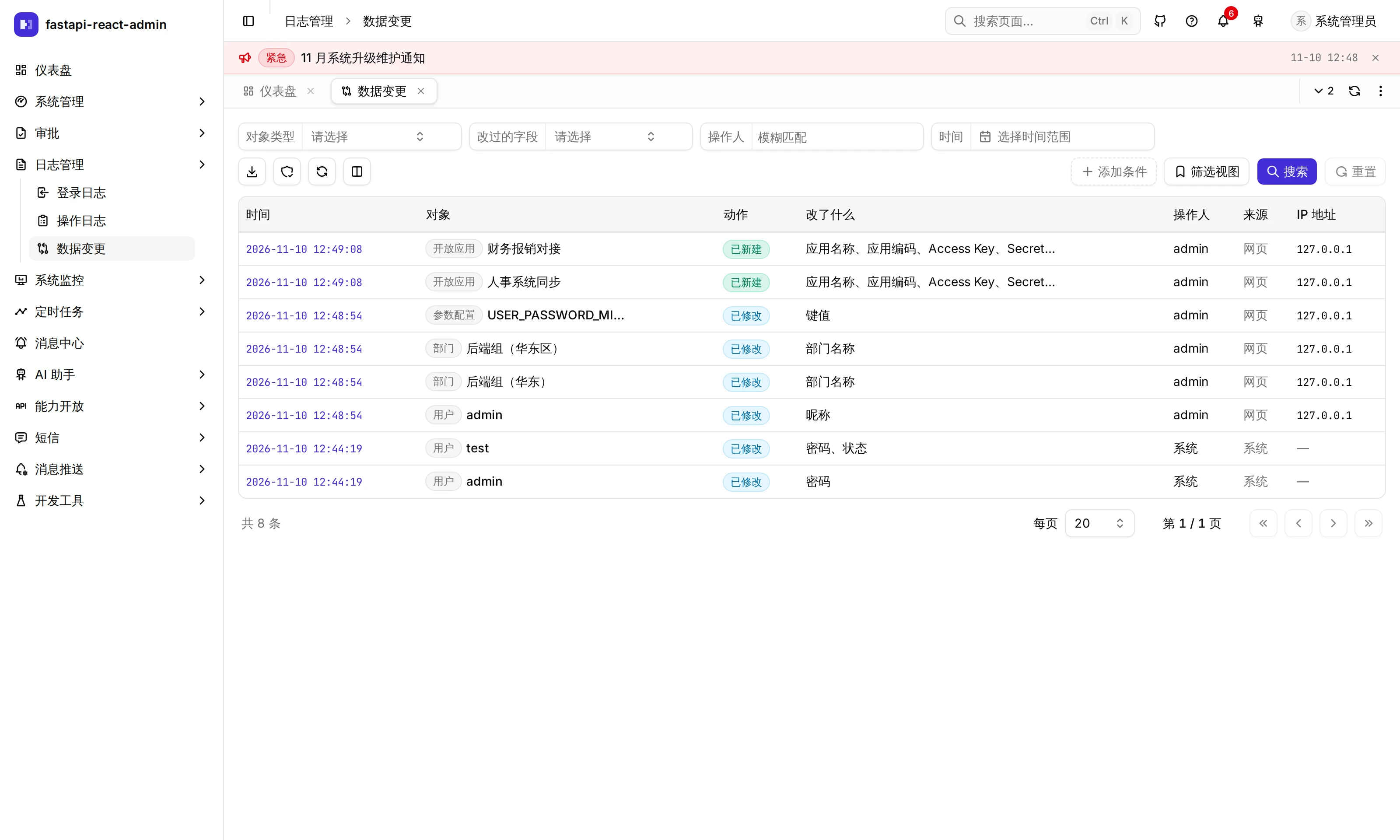
Where is it in the UI?
Section titled “Where is it in the UI?”| Screen | Path | Permission code | What it does |
|---|---|---|---|
| Logs → Sign-in log | /log/login | View log:login:list · export export · clear clear | Every sign-in attempt and security event |
| Logs → Operation log | /log/opera | View log:opera:list · export export · clear clear | Every API call; the detail view has What this request changed |
| Logs → Data changes | /log/change | View log:change:list · export log:change:export | Field-level before / after; superusers also get Check integrity |
| Change history row action on the Users, Departments, Roles, Menus and Config pages | — | log:change:list | The change history of that one object |
- The sign-in and operation log pages have no per-row delete, only Clear, which deletes the whole table regardless of the current filters. Data change history cannot be deleted or cleared; it is only pruned by its retention period.
- ⚠️ The frontend route guards of the sign-in and operation log pages currently check
log:login:del/log:opera:delrather thanlist, so a role granted only viewing cannot open them. The Data changes page checkslog:change:list. - Data change history is not limited by data scope: anyone with
log:change:listsees changes to every object.
What does the sign-in log record?
Section titled “What does the sign-in log record?”Each row has the username, success or failure, the reason, IP and location (country / region / city), browser, operating system, device, time, and an event type:
| Event | When it is recorded |
|---|---|
| Sign-in | Every sign-in attempt, successful or not |
| Account locked | Wrong passwords reached the threshold |
| IP locked | Failures across accounts from one IP reached the threshold |
| Forced logout | Kicked by an admin, password changed, or account disabled; the row holds the kicked device’s IP and browser |
- An unknown user and a wrong password are recorded with the same reason (the same message the sign-in page shows); “account locked” is only revealed after a correct password.
- For accounts with two-factor: nothing is recorded while the password is right but the code is still pending; passing the second step records “Signed in (two-factor)”, and a failed second step is recorded too.
- When SMS sign-in fails, the username column holds the matched account name, or a masked number (
138****1234) if none matched. - Third-party sign-in (GitHub / Google) only records successes. Sign-ins through the Swagger debug endpoint are not recorded.
- Locations come from a bundled offline IP database (
ip2region) by default; pure IPv6 addresses get no location. It can be switched to an online lookup or turned off. Results are cached in Redis for a day.
What does the operation log record, and how is it redacted?
Section titled “What does the operation log record, and how is it redacted?”Every request under /api/v1 gets a row, GET included: user, method, path, endpoint summary, IP and location, browser, request arguments, request headers, response headers, response body, HTTP status, business code, message and duration (ms).
Not recorded: paths listed in OPERA_LOG_PATH_EXCLUDE (API docs, the Swagger sign-in endpoint, third-party sign-in redirects and callbacks), OPTIONS requests, and requests whose client disconnected before the handler finished (recorded as 499 and not stored). Writes go through an async queue; when it is full (100,000 entries) new entries are dropped with a warning.
Truncation: a request body over 10 KB, or a file upload without a declared length, is replaced by a placeholder; application/octet-stream bodies are never read. Only JSON and plain-text response bodies are recorded, truncated at 10 KB, and JSON over 5 MB is not parsed.
Redaction happens before storage and before truncation, at any nesting depth (up to 20 levels):
- Exact key names:
password·old_password·new_password·confirm_password·captcha·otp·totp_secret·otpauth_uri·recovery_codes·mfa_token·access_token·refresh_token·token·api_key·secret_key·access_key_secret·mcp_token·webhook_url·sign_secret·import_token(the full list isOPERA_LOG_REDACT_KEYSinconf.py). - Key / value shaped data (a Config row, for example): when the key looks like a secret (ends in
PASSWORD,SECRET,TOKEN,API_KEY,CREDENTIALand so on, case-insensitive), the value next to it is masked. - Headers:
authorization,cookie,set-cookie,proxy-authorization,x-api-key,x-auth-token. - When in doubt it records less: a body declared as JSON that does not parse is not recorded, and an unparseable JSON response becomes a placeholder.
Someone with log:change:list who opens a write (non-GET) entry sees What this request changed: the data changes that request caused, up to 50, with an “N more” link to the Data changes page filtered to that request. In the other direction, every data change links back to the operation log entry that caused it. The two are joined by the request’s trace_id.
How is data change history captured?
Section titled “How is data change history captured?”Not by writing “record this” in each endpoint, but by hooking the database session: before a transaction commits, each object changed in it is compared and turned into “field · old value · new value”, written in the same transaction as the business data, so a rollback leaves no record behind. An object changed several times in one transaction gets one row with the final result.
Objects covered on main:
| Object | Also recorded under it |
|---|---|
| User | Roles, two-factor on / off and recovery codes, linking and unlinking third-party accounts |
| Department | |
| Role | Permissions (menus), data scopes |
| Menu | |
| Config |
- Every column must be classified: plain field, reference (which also stores the referenced object’s name at the time, so an old record keeps a department’s old name after a rename), secret, ignored, or soft-delete flag. An unclassified column makes the backend fail to start rather than silently skip it.
- Secret fields record only that they changed: passwords, recovery codes and Config values whose key looks like a secret show “Changed (value not recorded)”, in exports too.
- Link tables record the net change: “delete everything and add it back” with no actual difference records nothing.
- Source: web, AI assistant, import, third-party sign-in, background task or system, so you can tell at a glance whether a person clicked it in the UI.
- A single statement touching more than 500 rows is recorded as one summary row.
- Clicking a field name in the drawer shows that field’s history only; on the Data changes page the field goes into the URL and survives a reload.
How do I know the records have not been tampered with?
Section titled “How do I know the records have not been tampered with?”Each data change is numbered in order as it is written and signed with HMAC-SHA256 over the row’s content and the previous row’s signature, forming a chain. Editing a row, deleting one in the middle, deleting the last few, inserting one, or re-signing the whole chain with a different key all fail verification.
Three ways to verify, with the same result:
- Check integrity on the Data changes page (superusers only)
GET /api/v1/logs/changes/integrity(superusers only)fba data-change verifyon the command line, which exits with code 1 when it finds problems, for scheduled checks
The signing key is DATA_CHANGE_CHAIN_KEY in .env, kept in the environment and never in the database, so someone with database access who edits records cannot re-sign them to match. While it is empty, rows are signed with an empty key, which only catches accidental direct edits; the verification result says so. Once set, don’t change it: rows signed before a change are listed separately as signed with an older key. Someone holding both the database and the key is beyond what the chain can stop.
How long are records kept?
Section titled “How long are records kept?”| Records | Default | Where to change it |
|---|---|---|
| Sign-in and operation logs (plus open API call logs and SMS logs) | 180 days | The {"days": 180} argument of the log cleanup task under Scheduler |
| Data change history | 180 days | Config → Log → DATA_CHANGE_RETENTION_DAYS (1–3650) |
| Notification deliveries, webhook records | 30 days | Each one’s retention setting in Config |
The cleanup task maintenance.prune_logs runs daily at 03:15 and deletes by business time (sign-in time, operation time) in batches of 2,000. The 180 days come from Article 21 of China’s Cybersecurity Law, which requires network logs to be kept for at least six months; the migration that raised it from 30 to 180 days only changes the task if it was still at 30, leaving your own value alone. When data changes are pruned, the chain’s starting point is moved first, so verification still passes afterwards.
Which settings are there?
Section titled “Which settings are there?”Changed in the UI: data change retention (Config → Log) and sign-in / operation log retention (the task argument under Scheduler), see the previous section.
.env only, restart the backend after changing:
| Key | Default | Notes |
|---|---|---|
DATA_CHANGE_CHAIN_KEY | empty | Signing key for the tamper-evident chain, 64 hex characters; set it in production and don’t change it afterwards |
IP_LOCATION_PARSE | offline | Location lookup: offline bundled database / online online lookup / false off |
TRUSTED_PROXIES | [] | Your reverse proxies; without it, behind a proxy every IP in the logs is the proxy’s |
OPERA_LOG_PATH_EXCLUDE | API docs, third-party sign-in redirects, etc. | Paths not recorded in the operation log (exact match) |
OPERA_LOG_REDACT_KEYS · OPERA_LOG_REDACT_HEADERS | see above | Key names and headers that are masked |
OPERA_LOG_BODY_MAX_SIZE · OPERA_LOG_RESPONSE_MAX_SIZE | 10240 · 10240 | Bytes of request and response body recorded |
OPERA_LOG_RESPONSE_CONTENT_TYPES | application/json · text/plain | Response types whose body is recorded |
OPERA_LOG_QUEUE_MAXSIZE | 100000 | Length of the log write queue; entries are dropped when it is full |
Adding data change history to your own table
Section titled “Adding data change history to your own table”- Put a
data_change.pyin the module or plugin directory; it is picked up at startup. - Call
register_audited(...)for the model and classify every column (field / reference / secret / ignored / soft delete); useregister_audited_setfor link tables andregister_audited_childfor one-to-one child tables recorded under the parent. - Add each field’s Chinese and English label to both language packs and to
server-data-keys.json(a test checks this). - For entry points that are not web requests (background tasks, the CLI), mark the source with
data_change_source(...). - Avoid writes the session cannot see: raw
text()insert / update / delete, statement-styleinsert(Model), writing throughconnection()directly. A static guard test fails if production code uses them.
When you add a credential-like request field, add it to OPERA_LOG_REDACT_KEYS too: a test scans every endpoint’s schema and fails on credential-like fields that are not masked. Step-by-step notes and pitfalls are in common/data_change/AGENTS.md.
What it does not do
Section titled “What it does not do”- Not recorded: personal preferences, password history, session start and end (those are in the sign-in log); changes made by raw SQL, migrations or seed data.
- Failed third-party sign-ins and sign-ins through the Swagger debug endpoint are not in the sign-in log.
- A client can set the request’s trace_id with an
X-Request-IDheader, so the “what this request changed” link is not tamper-proof evidence; the chain protects the data change records themselves. - Data change history (chain included) is tested in CI on PostgreSQL and SQL Server; it has not been verified on MySQL.
- Sign-in and operation log retention is not on the Config page; it is the scheduled task’s argument.
Where is the code?
Section titled “Where is the code?”- Sign-in log:
login_log_service.py· IP and browser parsingutils/request_parse.py - Operation log:
middleware/opera_log_middleware.py· “looks like a secret” checkcommon/secret_keys.py - Data changes:
common/data_change/(capture.pycapture,registry.pyregistration,chain.pysigned chain) · built-in registrationsapp/admin/data_change.py - Cleanup:
prune_logsintasks/maintenance/tasks.py - Frontend:
pages/log-login/·pages/log-opera/·pages/log-change/· the shared change history drawer_shared/data-change/
How is it tested?
Section titled “How is it tested?”Backend tests run against a real database and Redis:
test_data_change.py(52 tests): production code has no write the capture cannot see (static guard); role menus record the net change with titles; a password reset is recorded as a secret change only; deleted records in the middle and at the end are caught; re-signing the whole chain another way is caught; the integrity endpoint is for superusers.test_prune_logs.py(19 tests): pruning uses business time, not insert time; the default retention agrees everywhere and meets the six-month floor; the migration only bumps the task still at 30; pruning chained data changes keeps the chain verifiable.tests/test_opera_log_redaction.py(25 tests): redaction happens before truncation; a client that left mid-request is not logged as a success; tokens in the sign-in response are masked.test_login_events.py: a forced sign-out records the kicked device and who kicked it.
In the browser (Playwright): data-change.spec.ts (rename a department → the row’s Change history shows old → new → filter the Data changes page by object → jump to that request’s operation log; the operation log’s What this request changed → see all on Data changes) and login-events.spec.ts (lock an account with wrong passwords → filter the sign-in log by Account locked).
Try it on the demo
Section titled “Try it on the demo”On the live demo (admin / 123456), rename a department under System → Departments, then open that row’s Change history to see old name → new name; follow it to the operation log entry that caused it and look at the arguments and duration. admin is a superuser, so Check integrity on the Data changes page works too. The demo is shared, so please rename it back afterwards.