
Scheduled jobs
Scheduled jobs live in the database table task_scheduler; Celery beat reads them and dispatches on time, and workers run them. Creating, editing, enabling or disabling a job under Scheduler → Tasks needs no beat restart: every change tells beat to re-read the table. The result of each run (success or failure, return value, traceback, which worker ran it) is kept under Task history for 30 days. The system ships 11 jobs, and log cleanup, export expiry, notification delivery and approval timeouts all depend on them.
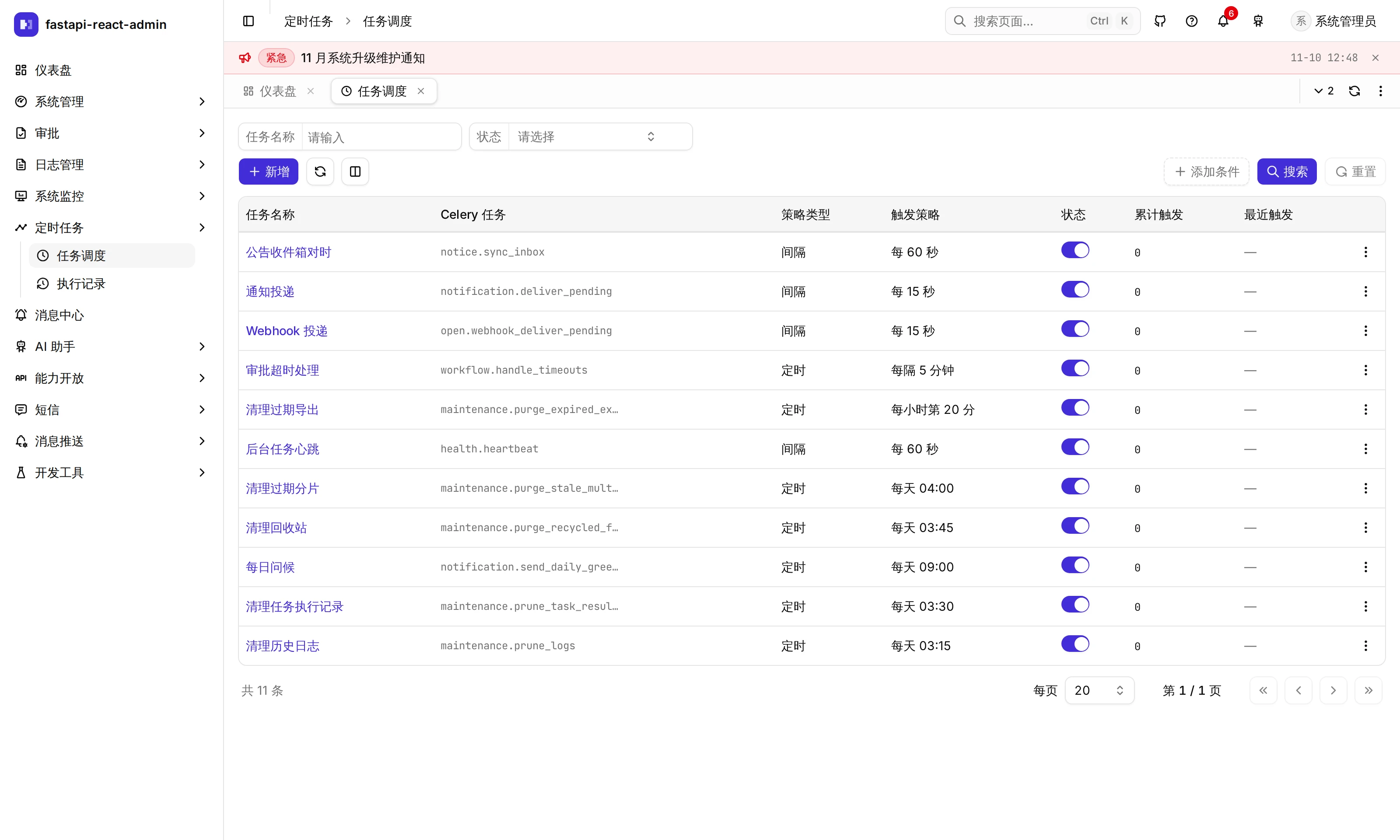
Where is it in the UI?
Section titled “Where is it in the UI?”| Screen | Path | Permission code | What it does |
|---|---|---|---|
| Scheduler → Tasks | /scheduler/manage | View task:scheduler:list · create add · edit and enable / disable edit · run now run · delete del | Job list, create / edit, cron preview |
| Scheduler → Task history | /scheduler/record | View task:result:list | Status, retries and worker of each run; click the time for the return value and traceback |
⚠️ The Tasks page’s frontend route guard checks task:scheduler:edit, not list, so a role granted only viewing cannot open it. The Task history page has no route guard, but its list endpoint needs task:result:list; without it the page opens and the list fails to load.
What can a job be configured with?
Section titled “What can a job be configured with?”| Field | Notes |
|---|---|
| Name | A label for people |
| Celery task | Picked from a dropdown only: the tasks registered in the worker (Celery’s own celery.* tasks excluded); free text is not allowed |
| Schedule type | Cron (5-field crontab) or Interval (seconds / minutes / hours / days) |
| Run once only | Stops after one run |
| Enabled | Disabled jobs are not dispatched |
| Positional arguments · Keyword arguments | A JSON array · a JSON object, passed to the task function as they are |
| Remark |
The server requires a 5-field crontab that Celery can parse, and a start time before the end time; the builder in the UI also rejects Quartz-style expressions with seconds or ?.
Cron preview: the form has shortcut chips for common schedules and a visual builder, and lists “Next 5 runs (server time zone …)”, computed in the server’s time zone rather than the browser’s, so “9 o’clock here, 1 o’clock on the server” cannot happen silently.
Each job in the list has an enable switch, Run now (dispatches whether or not the job is enabled, and returns the Celery task ID) and delete. A row pointing at a task not registered in the worker is shown in red: beat still dispatches it, the worker drops it, and the only trace is a Received unregistered task line in the worker log.
When does a change take effect?
Section titled “When does a change take effect?”Immediately. After every change made through the UI or API (create, edit, enable / disable, delete) commits, a “changed” marker is set in Redis; beat checks it on every tick and re-reads the table when it sees it. Beat also re-reads the table every 5 minutes regardless, to catch edits made directly in the database.
Cron uses the wall-clock time of DATETIME_TIMEZONE (default Asia/Shanghai): 30 2 * * * means 2:30 local time. PostgreSQL returns timestamps in UTC, which once made jobs fire 8 hours late or re-run the day’s jobs when beat started; times read back are now converted to the application time zone first.
Which jobs are built in?
Section titled “Which jobs are built in?”The 11 seeded jobs, all enabled by default (names are the seeded Chinese names):
| Name | Task | When | What it does |
|---|---|---|---|
| 清理历史日志 (prune logs) | maintenance.prune_logs | Daily 03:15, argument {"days": 180} | Deletes sign-in, operation, open API and SMS logs older than N days; notification deliveries, webhook records and data changes use their own retention. See Logs and audit |
| 清理任务执行记录 (prune task results) | maintenance.prune_task_results | Daily 03:30, argument {"days": 30} | Deletes run history older than N days |
| 清理回收站 (empty recycle bin) | maintenance.purge_recycled_files | Daily 03:45 | Permanently deletes recycle-bin files older than FILE_RECYCLE_DAYS |
| 清理过期分片 (stale chunks) | maintenance.purge_stale_multipart | Daily 04:00 | Removes chunks left by expired chunked uploads |
| 清理过期导出 (expired exports) | maintenance.purge_expired_exports | Minute 20 of every hour | Deletes expired export files, marks stuck exports as failed, deletes old records |
| 每日问候 (daily greeting) | notification.send_daily_greeting | Daily 09:00 | Sends everyone a random greeting (a demo; disable it if you don’t want it) |
| 后台任务心跳 (worker heartbeat) | health.heartbeat | Every 60 s | Writes the worker heartbeat that the health check relies on |
| 公告收件箱对时 (notice sync) | notice.sync_inbox | Every 60 s | Publishes scheduled notices when due and withdraws expired ones |
| 通知投递 (notification delivery) | notification.deliver_pending | Every 15 s | Sends queued email, SMS and group-bot messages |
| Webhook 投递 (webhook delivery) | open.webhook_deliver_pending | Every 15 s | Sends due webhooks |
| 审批超时处理 (approval timeouts) | workflow.handle_timeouts | Every 5 minutes | Reminds, auto-approves or auto-rejects overdue approvals, per node settings |
The last four come from plugins (notices, notifications, open platform, workflow) and are absent if the plugin is not installed.
What matters in production?
Section titled “What matters in production?”- Run exactly one beat. With two, every job is dispatched twice. The production compose pins beat’s
container_name: fba_beat, so--scale beat=2fails loudly instead of quietly starting a second one. Workers can be scaled as needed. - In development,
pnpm devembeds beat in the worker with-Bon Linux; on macOS and Windows they are separate processes.-Bis for development only. - The broker’s Redis database defaults to 1 (
CELERY_BROKER_REDIS_DATABASE). If another project’s Celery also uses database 1 on the same Redis, the two steal each other’s tasks; pick an unused database number. - Task timeouts are enforced by the repository’s own
with_timeout, 30 minutes by default (CELERY_TASK_TIME_LIMIT).
Which settings are there?
Section titled “Which settings are there?”Scheduled jobs have nothing on the Config page; each job is configured in the UI. In .env (restart the worker and beat after changing):
| Key | Default | Notes |
|---|---|---|
CELERY_BROKER | redis | Or rabbitmq (then set CELERY_RABBITMQ_*) |
CELERY_BROKER_REDIS_DATABASE | 1 | Redis database for the broker; change it when sharing Redis with other projects |
CELERY_TASK_TIME_LIMIT | 1800 | Maximum seconds a task may run |
CELERY_TASK_MAX_RETRIES | 5 | Retries after failure |
DATETIME_TIMEZONE | Asia/Shanghai | Cron is evaluated in this time zone’s local time |
How do I add my own scheduled job?
Section titled “How do I add my own scheduled job?”- Write it in
apps/api/backend/app/task/tasks/<package>/tasks.py; the worker only scans this directory. - Register it with
@celery_app.task(name='package.task')and wrap it with@with_timeout()(seetasks/base.py). - Jobs running every 60 seconds or more often need
ignore_result=True, notify=False, or the history table grows by thousands of rows a day; a test enforces this. - After restarting the worker it appears in the Celery task dropdown; configure the schedule in the UI.
- To ship a default schedule with the code, add a seed SQL row and a data migration. Don’t use Celery’s
beat_schedule: the database is the only source of schedules.
Jobs that delete data have extra rules: delete in batches (select a batch of IDs, then delete by ID); index the filter column; filter by business time, not insert time; use keyset paging when processed rows can still match the filter. Details are in app/task/AGENTS.md.
What it does not do
Section titled “What it does not do”- Start / end time, expiry seconds and queue cannot be set in the UI (the API supports them, and editing in the UI does not clear existing values).
- Task history has no delete button; old records are only removed by the prune-task-results job.
- The scheduler heartbeat may keep being written while beat is stuck; schedules changed directly in the database can take up to 5 minutes to apply.
- Job completion messages are in Chinese only for now.
Where is the code?
Section titled “Where is the code?”- API and service:
app/task/api/v1/·scheduler_service.py - Beat’s database scheduler:
app/task/utils/schedulers.py· Celery appapp/task/celery.py - Built-in jobs:
app/task/tasks/ - Frontend:
pages/scheduler-manage/(cron-builder.tsx,cron-presets.ts) ·pages/scheduler-record/
How is it tested?
Section titled “How is it tested?”Backend (apps/api/backend/app/task/tests/):
test_scheduler_timing.py: disabling takes effect without restarting beat; a crontab re-read from the database keeps the local wall clock; one disabled schedule does not starve the rest.test_scheduler_api.py: every write tells beat after it commits; every schedule in the database points at a registered task; high-frequency tasks neither record results nor broadcast.test_scheduler.py:beat_schedulestays empty; the last run time is converted to the application time zone.test_prune_logs.py: deletes in batches, not one unbounded statement.
In the browser (Playwright): scheduler.spec.ts, covering the task list, history, cron preview, task arguments and history filters.
Try it on the demo
Section titled “Try it on the demo”On the live demo (admin / 123456), open Scheduler → Tasks, click New, switch to Cron, pick a shortcut and look at the next 5 run times listed below; no need to save. You can also Run now on the daily greeting job, then check its result under Task history; the bell in the top bar receives the greeting. The demo is shared, so please don’t disable the built-in jobs.